Hello,
I just updated the Capacitor packages to the latest stable version but now, there is some little issues:
- The
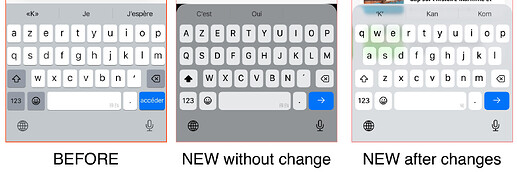
@capacitor/keyboard@7.0.3has black corners and the transparent effect does not fit correctly. I had to change the Capacitor keyboard settings to overlay the keyboard instead of changing the viewport/body to keep the glass effect visible and account for the new rounded corners

Here are the changes I made to achieve this:
(If there is a better way to get the same result, please tell me how  ).
).
// in capacitor.config.json
"Keyboard": {
	"resize": "none",
	"resizeOnFullScreen": false
}

// in app.component.ts
Keyboard.addListener('keyboardWillShow', info => {
	const height = info.keyboardHeight;
	const contents = document.querySelectorAll('ion-content');

	contents.forEach(content => {
		const scrollEl = content.shadowRoot?.querySelector('.inner-scroll') as HTMLElement | null;
		if (scrollEl) {
			scrollEl.style.paddingBottom = `${height}px`;
		}
	});
});
Keyboard.addListener('keyboardWillHide', () => {
	const contents = document.querySelectorAll('ion-content');

	contents.forEach(content => {
		const scrollEl = content.shadowRoot?.querySelector('.inner-scroll') as HTMLElement | null;
		if (scrollEl) {
			scrollEl.style.paddingBottom = `0px`;
		}
	});
});
- The
presentingElementsetting seems incompatible with the ModalController. In fact, when the modal opens, there is no stacking effect anymore.
Is there a way to keep the stacking render or should I adapt to use a basic modal?
![image]()

There may be other changes that are not compatible with iOS 19. Do you have any feedbacks on this?
Thanks for your help,
Loïc
1 post - 1 participant