↧
TypeError: Cannot read property 'data' of undefined

↧
Is it possible to add my own icon?
@RaulGM wrote:
It’s actually an ionic 4 question:
Is it possible to add an Icon I designed on my own?
Posts: 1
Participants: 1
↧
↧
Problems with ion-select after migrating to Ionic 4
@sonnenhohl wrote:
My app is deployed with Ionic 3 and now i’m into the process of migrating to Ionic 4.
One problem im having is with the ion-select using ngModel and ngModelChange,
it seems when i select one option the ngModelChange isn’t dispatched but with ionChange it is, also the ngModel isnt being updated.My code:
<ion-item>
        <ion-label floating>{{ 'Model' | translate }}</ion-label>
        <ion-select name="model" [(ngModel)]="device.model" (ngModelChange)="updateFirmwareList()" [disabled]="!isNew"
          required #model="ngModel" [cancelText]="ionSelecNameCancel" [okText]="ionSelecNameOk" ngDefaultControl>
          <ion-select-option *ngFor="let model of modelList" [value]="model">{{ model }}</ion-select-option>
        </ion-select>
      </ion-item>
I have already loaded the modules FormsModule, ReactiveFormsModule.
No errors are being displayed.
Posts: 1
Participants: 1
↧
Structuring React apps
@ollie-w wrote:
It’s nice to see that there is documentation for individual elements for React now. However, actually knowing how to structure an app is a bit difficult as the only reference is the conference app. When do I need to use
IonPage, for example?It seems like Ionic is very opinionated about structure.
What my app currently looks like using split-pane - its split into three

Posts: 1
Participants: 1
↧
Ionic4 white screen
@eklimshines wrote:
Hello.
I have some problem.
When I run android without --prod, it is ok.
but, when I run android with --prod, white screen is shown.
I checked error log.
how to fix it? plz.
ERROR Error: Uncaught (in promise): Error: StaticInjectorError[n -> e]:
StaticInjectorError(Platform: core)[n -> e]:
NullInjectorError: No provider for e!
Error: StaticInjectorError[n -> e]:
StaticInjectorError(Platform: core)[n -> e]:
NullInjectorError: No provider for e!
at t.CcnG.t.get (main.c71af0b9e8b86513fbc8.js:1)
at main.c71af0b9e8b86513fbc8.js:1
at t (main.c71af0b9e8b86513fbc8.js:1)
at t.CcnG.t.get (main.c71af0b9e8b86513fbc8.js:1)
at main.c71af0b9e8b86513fbc8.js:1
at t (main.c71af0b9e8b86513fbc8.js:1)
at t.CcnG.t.get (main.c71af0b9e8b86513fbc8.js:1)
at po (main.c71af0b9e8b86513fbc8.js:1)
at t.CcnG.t.get (main.c71af0b9e8b86513fbc8.js:1)
at po (main.c71af0b9e8b86513fbc8.js:1)
at t.CcnG.t.get (main.c71af0b9e8b86513fbc8.js:1)
at main.c71af0b9e8b86513fbc8.js:1
at t (main.c71af0b9e8b86513fbc8.js:1)
at t.CcnG.t.get (main.c71af0b9e8b86513fbc8.js:1)
at main.c71af0b9e8b86513fbc8.js:1
at t (main.c71af0b9e8b86513fbc8.js:1)
at t.CcnG.t.get (main.c71af0b9e8b86513fbc8.js:1)
at po (main.c71af0b9e8b86513fbc8.js:1)
at t.CcnG.t.get (main.c71af0b9e8b86513fbc8.js:1)
at po (main.c71af0b9e8b86513fbc8.js:1)
at P (polyfills.4601d1912f38da6a8049.js:1)
at P (polyfills.4601d1912f38da6a8049.js:1)
at polyfills.4601d1912f38da6a8049.js:1
at e.invokeTask (polyfills.4601d1912f38da6a8049.js:1)
at Object.onInvokeTask (main.c71af0b9e8b86513fbc8.js:1)
at e.invokeTask (polyfills.4601d1912f38da6a8049.js:1)
at t.runTask (polyfills.4601d1912f38da6a8049.js:1)
at g (polyfills.4601d1912f38da6a8049.js:1)
ationic info
Ionic:
ionic (Ionic CLI) : 4.11.0 (/usr/local/lib/node_modules/ionic)
Ionic Framework : @ionic/angular 4.1.1
@angular-devkit/build-angular : 0.13.5
@angular-devkit/schematics : 7.2.4
@angular/cli : 7.3.5
@ionic/angular-toolkit : 1.4.0Cordova:
cordova (Cordova CLI) : 8.1.2 (cordova-lib@8.1.1)
Cordova Platforms : android 7.1.4
Cordova Plugins : cordova-plugin-ionic-keyboard 2.1.3, cordova-plugin-ionic-webview 3.1.2, (and 14 other plugins)System:
Android SDK Tools : 26.1.1
ios-deploy : 1.9.4
ios-sim : 8.0.0
NodeJS : v10.15.3 (/usr/local/bin/node)
npm : 6.4.1
OS : macOS Mojave
Xcode : Xcode 10.1 Build version 10B61
Posts: 1
Participants: 1
↧
↧
Working with a remote app and native API
@avif wrote:
Hi,
I need to build an app that uses a camera with ionic+angular+cordova, I want to host my files remotely so I less dependent on the store.
Is it possible to build the app with native use and host remotely?Can you point me to some documentation about that?
Thanks
Posts: 1
Participants: 1
↧
Onesignal open post in the app
@Saban wrote:
Is there any way to open wordpress post Onesignal notification in app? I need It when wordpress push notification via Onesignal to Android App to open that post in the App.
Posts: 1
Participants: 1
↧
How do channels work excactly with AppFlow? App showing wrong build on first load
@motionstrand wrote:
I built an app that I got into apple’s test flight and today I sent out the notifications to users to start beta testing, but for some reason it is showing the user the previous build. If the user closes the app and reopens the app it shows the current version.
In my config.xml file I have defined
<plugin name="cordova-plugin-ionic" spec="5.2.8">
    <variable name="APP_ID" value="my app id" />
    <variable name="CHANNEL_NAME" value="Master" />
    <variable name="UPDATE_METHOD" value="auto" />
    <variable name="UPDATE_API" value="https://api.ionicjs.com" />
    <variable name="MAX_STORE" value="2" />
    <variable name="MIN_BACKGROUND_DURATION" value="30" />
</plugin>
Is something here wrong? Not sure why this is happening. This also was happening to me when I was testing on my own device using a development provisioning profile. I had to always open the app once, close it and reopen it to see the new build. Any ideas?
Posts: 1
Participants: 1
↧
Ionic 4 - Is there a way to create swipeable tabs?
@nuagoz wrote:
Hi all,
I noticed that there was a lot of way to create swipeable tabs (animated) on Ionic 3 like this library.
But with the changes made by Ionic 4, I didn’t find anyone who managed to get this result.
There are swipeable tabs but without animation.So, it doesn’t work the same way ! It only consists of passing a page in the foreground.
I wanted to know if it was possible to obtain, with Ionic 4, a result like this one, or if there was a workaround to obtain a similar result ?
Thanks !

Posts: 1
Participants: 1
↧
↧
Can't close inAppBrowser on loadStop
@wekas wrote:
I want to close the inAppBrowser window once a certain url has finished loading. User finishes survey.
The code below has the error:
Cannot read property 'close' of undefined
on the line
this.iabRef.close();Can I not reference this global variable from inside a callback function?
Any ideas?import { Component } from '@angular/core'; import { InAppBrowser } from '@ionic-native/in-app-browser/ngx'; declare var cordova: any; @Component({ selector: 'app-tab1', templateUrl: 'tab1.page.html', styleUrls: ['tab1.page.scss'] }) export class Tab1Page { private iabRef; loadStopCounter = 0; constructor(private iab: InAppBrowser) { } buttonClick(link) { console.log('button click'); const target = '_blank'; const options = 'location=yes,zoom=no,hideurlbar=yes,hidenavigationbuttons=yes,closebuttoncaption=Click here to return to App,closebuttoncolor=#f04141'; this.iabRef = cordova.InAppBrowser.open(link, target, options); // this.iabRef.close(); This works!!! this.iabRef.addEventListener('loadstop', this.loadStop); } loadStop(params, callback) { this.loadStopCounter++; if (params.url.substr(params.url.lastIndexOf('/') + 1) === 'formResponse') { // This does not work this.iabRef.close(); } } }
Posts: 1
Participants: 1
↧
Parcel.js and @ionic/core
@touletan wrote:
Once @ionic/core npm package donwloaded in my project (under node_modules), How can I use it with Parcel.js apps bundler?
Can someone provide and quick example?
Posts: 1
Participants: 1
↧
Cordova plugin ionic can handle download files update
@cuongnguyen wrote:
Hi all for now i used ionic 1 and cordova plugin ionic 5.2.7.
So each i used ionic deploy and only change one file ex: index.html but ionic deploy will download all content of www folder this make long time to download.
With cordova plugin ionic how can i only download file change not all content?
Please help me thanks!
Posts: 1
Participants: 1
↧
Ionic 3 expand header on click
@RubyRavenford wrote:
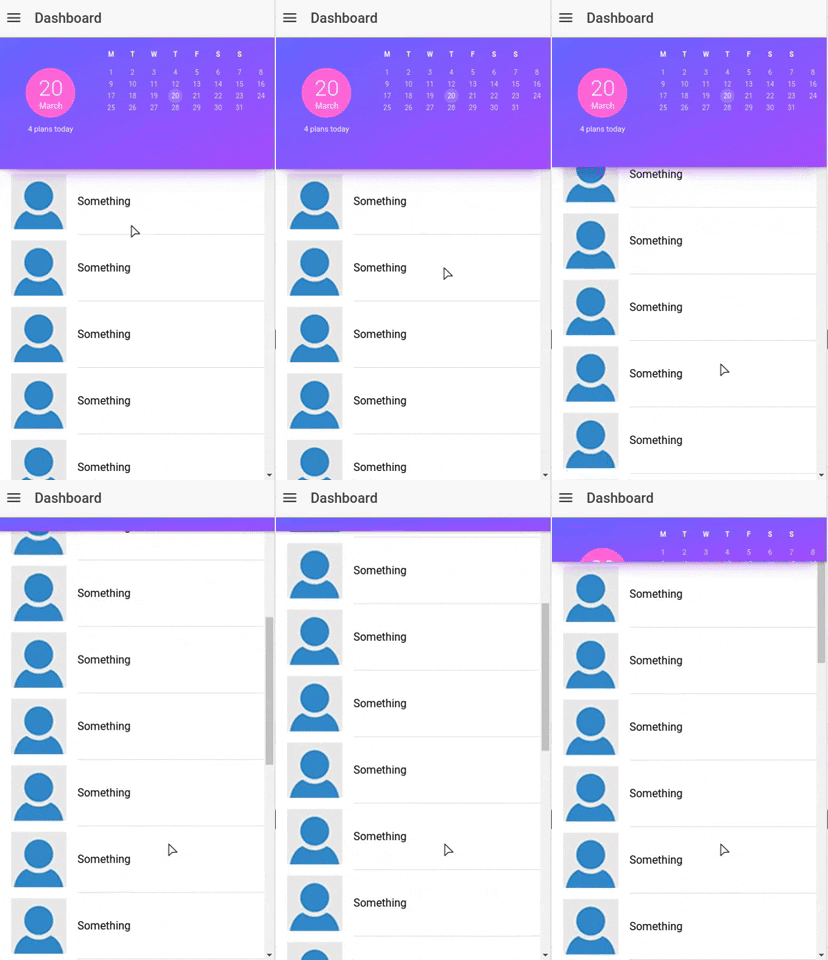
I am using Ionic 3, and have implemented an Expandable Header based on this tutorial from Joshmorony.
It works perfectly while expanding on scroll :
![]()
My problem is I want to expand the header on click instead of on scroll. When I click on the menu button, the header is expanded.
This is my code:
shrinking-segment-header.ts
  @Input('scrollArea') scrollArea: any;
  @Input('headerHeight') headerHeight: number;

  newHeaderHeight: any;

  ...

  ngAfterViewInit() {
    this.renderer.setElementStyle(this.element.nativeElement, 'height', this.headerHeight + 'px');
    this.scrollArea.ionScroll.subscribe((ev) => {
      this.resizeHeader(ev);
    });
  }

  resizeHeader(ev) {
    ev.domWrite(() => {
      this.newHeaderHeight = this.headerHeight - ev.scrollTop;
      if (this.newHeaderHeight < 0) {
        this.newHeaderHeight = 0;
      }
      this.renderer.setElementStyle(this.element.nativeElement, 'height', this.newHeaderHeight + 'px');
    });
  }
And I call the component like this:
dashboard.ts
  <shrinking-segment-header [scrollArea]="myContent" headerHeight="190">
      {my content here}
  <shrinking-segment-header>
If someone know how to trick the expandable header on click, please help me. Any advise appreciated. Thank you.
Posts: 1
Participants: 1
↧
↧
Ionic v4 routing conversion from v3, thoughts
@royappa wrote:
I returned to ionic after a long absence during which v3 had changed to v4. Most of the upgrades were easy, but of course as they warn, Routing has changed a lot. Here is a ramble about how I converted my simple v3 “master-detail” routing to v4.
First the v3: there was a “meds” page with the master list of meds, and clicking one item took you to the “detail” page. In the old “meds.html” I could do this:
     <ion-item *ngFor="let med of meds" text-wrap>
      <div class="inner" (click)="itemSelected(med)">
And in the corresponding old “meds.ts” typescript file that function was:
itemSelected(item) {
     this.navCtrl.push(MedDetailPage, {
       item: item
     });
  }
And finally in the old “med-detail.ts” we simply injected “
public navParams: NavParams,” and then did this:
this.item = navParams.get('item');
The detail page has easily grabbed the item that was clicked in the master page. Done.Ionic v4 conversion
We have to add this route:
app-routing-module.ts:
 { path: 'med-detail', loadChildren: './med-detail/med-detail.module#MedDetailPageModule' }
The master HTML in meds.page.html must now pass the clicked object’s ID, and not the whole object:
     <ion-item *ngFor="let med of meds" text-wrap>
      <div class="inner" (click)="itemSelected(med.id)">
Fair enough, we can’t pass a whole object. The rest, though, took a lot of time to figure out.
The meds.page.ts is now like this:
  itemSelected(itemId) {
    this.navCtrl.navigateForward(['/med-detail/'], {queryParams: {id: itemId}});
  }
In the med-detail.page.ts, where this navigation ends up, I have to inject “
private route: ActivatedRoute” (here I had to figure out why “ActivatedRoute” vs. just “Route”, but it’s an Angular thing I guess).Then fetch the ID from the parameters and re-constitute the object back from its ID:
    const id: string =  this.route.snapshot.queryParams['id'];
    this.item = this.medService.getMed(id);
It took a while and as usual a lot of Googling, Josh Moroney’s awesome site, etc., but it works.
General thoughts:
Routing in Ionic v3 felt very object-oriented. A page was an object, you navigated to page objects with a simple stack, passing parameter objects as you go. It felt uniquely “Ionic”. Now in Ionic v4, we have to get dirty with actual page paths, object IDs, and parameter syntax where positioning of “:” and “/” is very important.
Having to go back and learn about things like “href”, “routerLink”, and concatenating paths with parameters – things like “’/med-detail/’ + med.id” or whatever – feels very raw, very old-school. I know it’s Angular, and it’s easy enough to learn. It just does not feel “Ionic” at all.
And for me this is a big loss. It’s just not as much fun to write, and navigation is a huge part of any app. I sincerely hope this can be “re-ionized” and the “routing” part hidden. I will learn a nice clean new API for navigating.
Simple master-detail parameter passing is not yet fully explained in the official documentation. To get my v3 demo working in v4, I had to dig into code: https://github.com/ionic-team/ionic/blob/master/angular/src/providers/nav-controller.ts and then dig into the Angular stuff used by Ionic, which led to this useful page: https://angular.io/api/router/NavigationExtras
That’s finally where I learned about “queryParams” - without which you can’t pass query parameters.
Currently a Google search of “
site:ionicframework.com/docs queryParams” returns no v4 matches. Maybe it’s somewhere else, but without queryParameters, you have to go really old-school. I refuse to concatenate params with ‘?’ and ‘+’ and what-not!!Finally, a few minor things:
- I am confused about https://ionicframework.com/docs/api/nav which refers to push/pop of pages.
Is this a first-class citizen of ionic-v4 suitable for use as a “v3-style” navigation system?
Or is this only for modals, as hinted at the top of the document?
Or is this something which will be deprecated?- An “Improve this doc” link in v4 docs would be nice.
- Wondering why there is no ionic-v4 tag in the forum, maybe to get away from version numbers?
- Google v4 documentation, and the top search result link is v3. I think adding a v4 link on top of the v3 pages would be nice. Image below shows what I mean.
Thanks for reading! Corrections, comments, suggestions all welcome.

Posts: 1
Participants: 1
↧
Cordova Anti Tampering
@ng22792 wrote:
Has anyone implemented this plugin in their project?
I have implemented the plugin but and called this function:window.cordova.plugins.AntiTampering.verify(
function (success) {
console.info(success);
// {“assets”: {“count”: x}} - where x is the number of assets checked
},
function (error) {
console.error(error);
// gives you the file on which tampering was detected
}
);The problem is, the function goes in the success block but the count is 0, which means the plugin doesn’t actually scan any files. I want to know what’s wrong.
Mentioning the steps that I have followed:
Step One: Installation using cmd.
command was:
cordova plugin add cordova-plugin-antitampering --variable ENABLE_CORDOVA_CALLBACK=true --saveStep two: Invoke method in app.component.ts using this code:
constructor(){
this.checkTampering();
}checkTampering( ) {
alert(“Inside Check Tampering”);
try {
alert("Inside Try: ");
window.cordova.plugins.AntiTampering.verify(
function (success) {
alert(JSON.stringify(success));
// {“assets”: {“count”: x}} - where x is the number of assets checked
},
function (error) {
alert(JSON.stringify(error));
// gives you the file on which tampering was detected
}
);} catch (e) { alert("Caught some exception when implementing Integrity check: " + JSON.stringify(e)); }}
Step 3 : Run it on the device using command: ionic cordova run android
Posts: 1
Participants: 1
↧
Getting null as the token on getToken() in cordova-plugin-fcm
@sanim10 wrote:
0
I want to implement push notification using ionic 3 and firebase. I am using cordova-plugin-fcm but I am getting the token as null on
getToken(). I have already set up the project on firebase and downloaded the google services. When I used this plugin a year back everything was working perfectly. Now when I am using it on my new project I am gettingnullas the token. Is thegetToken()deprecated? I have installed the fcm plugin as well as@ionic-native/fcm. According to the new documentation the plugin is now renamed ascordova-plugin-fcm-with-dependecy-updated, I have tried this too but the result is same. I can’t use the console as native plugins are already installed.my component.ts
this.fcm.subscribeToTopic('all');
  alert('here');
  this.fcm.getToken().then(token => {
    alert(token);
    localStorage.setItem('token', token);
    alert(token);
  });
  this.fcm.onNotification().subscribe(data =>{
    alert('Your order as been assigned.Please reload the page')
    if(data.wasTapped){
      //alert('background');
    } else {
      //alert('foreground');
    }
  });
  this.fcm.onTokenRefresh().subscribe(token => {
    //alert('token')
  });
Posts: 1
Participants: 1
↧
How to show an message if product is not found after searh
@flycoders_sourav wrote:
How to show an message if product is not found after searh
below my codegetItems(ev) { // Reset items back to all of the items this.initializeItems(); console.log(ev); // set val to the value of the ev target var val = ev.target.value; console.log(val) // if the value is an empty string don't filter the items if (val && val.trim() != '') { this.serarchProduct = this.serarchProduct.filter((item) => { return (item.product_name.toLowerCase().indexOf(val.toLowerCase()) > -1); }) } }Please help me out
any help would be highly appreciated
Thanks
Posts: 1
Participants: 1
↧
↧
Ionic4 permissions native api issue in android app
@rajesh5129 wrote:
I am developing an ionic4 app and I integrated https://ionicframework.com/docs/native/android-permissions native API and when I run in my android app it is showing ‘java.lang.ClassNotFoundException: com.android.plugins.Permissions’ error can anyone provide me with the solution to solve this issue.
Posts: 1
Participants: 1
↧
Ionic 3 : How to display array of arrays?
@harshm90 wrote:
I have a following consoled list of array how can i display the list?
I tried
this.item = this.data.["0"]  // this is throwing an error

//Also i tried
this.item = this.data[0]
console.log(this.item)         //Shows the output as Undefined
how can I achieve this?


Posts: 1
Participants: 1
↧
Ionic 4 Footer Tab Menu Issue
@manojpatel0217 wrote:
Footer tab menu is not come up through out the app like we have in ionic 3
it showing only on master pages not on the detail pagecan anyone help me out on this
Posts: 1
Participants: 1
↧